
Completeness rules
A rule says which fields an item of a class must have before it counts as complete. Editors then see a score in the editor, as a list column and filter, and on the overview.
Nothing changes until you switch a rule on. There are no rules to begin with. While a rule is off, nobody sees a score, column, filter, badge or card for that class.
Set up a rule
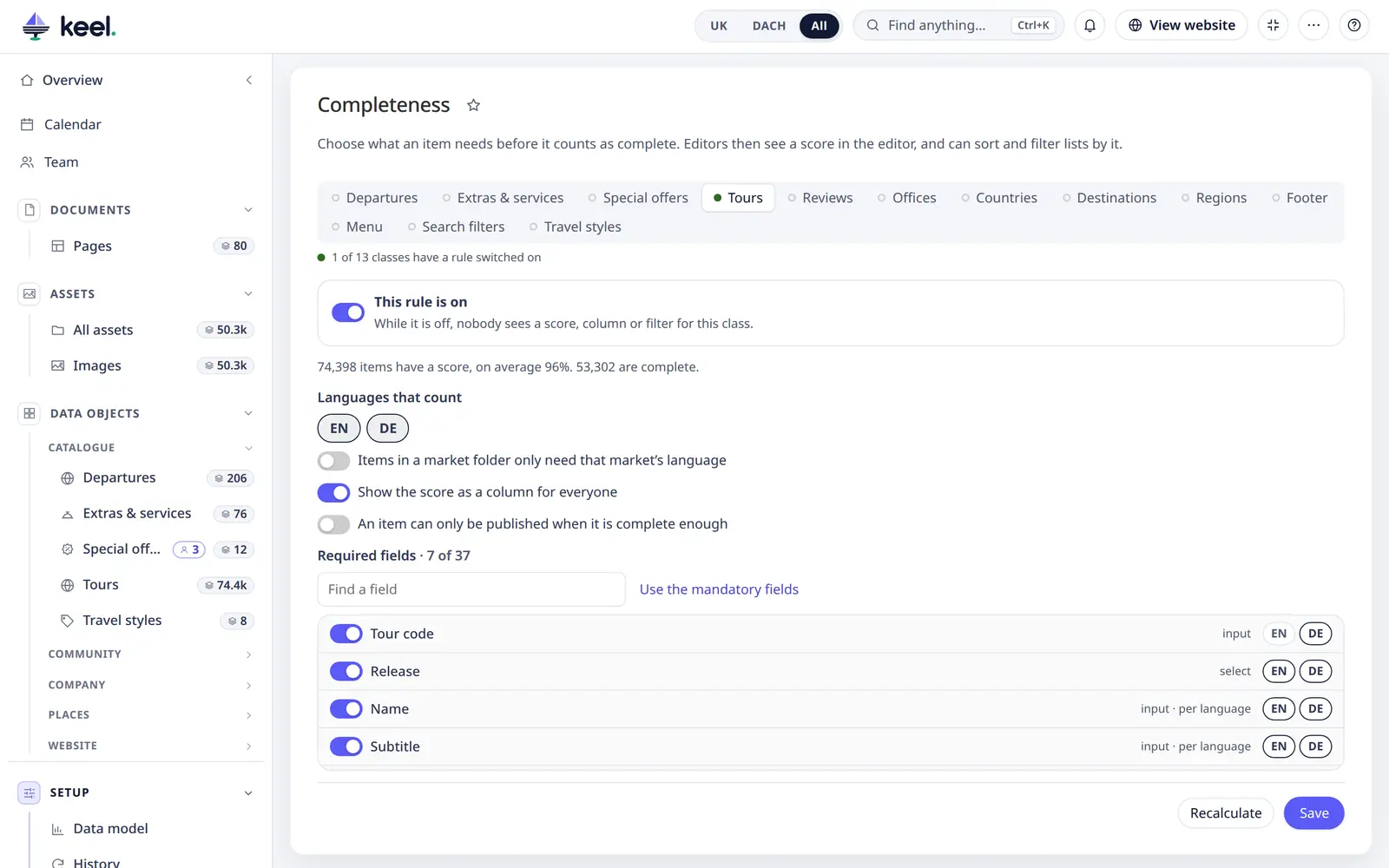
- Open Setup → Settings → Completeness and choose the class.
- Tick the required fields. Use the mandatory fields ticks what the class itself marks as mandatory; nothing is stored until you save.
- On a site with several languages, choose the languages that count. For a single field, the language buttons next to it limit it to some of them.
- On a site with markets, tick Items in a market folder only need that market's language if each market
has its own items. A tour under
/Tours/de/then does not need an English text. - Show the score as a column for everyone adds the column to the class's lists. It gives way when a list has no room left. Editors can always add it in Columns.
- Optional: switch on An item can only be published when it is complete enough and set the Score needed to publish (1–100 %, 80 % to start with) – see Publish rule.
- Tick This rule is on and Save.
Saving starts a recalculation on the server. Follow it in Bulk jobs; you can close the page. Until it reaches an item, that item keeps its old score, or none. The job needs the same worker as bulk jobs, see Troubleshooting. Changing only the column option starts nothing.
Classes are tabs at the top. A green dot marks the classes whose rule is on (1 of 13 classes have a rule switched on).
Publish rule
With the publish rule on, an incomplete item cannot go live. When a draft or a new item is published, Keel works out its score as it is about to be saved. Below the score needed, the save is refused with a message that names what is missing:
Not complete enough to publish: 80% filled in, 100% is needed. Missing: Subtitle (DE), Short description (DE).
- It applies however the item is published: Keel's editor, bulk changes, schedules, workflow steps, imports, and Pimcore's own editor.
- Items that are live already can still be saved, and drafts and versions can always be saved. So a rule added later locks nobody out.
- Changing the score needed does not recalculate any scores.
- Users with field limits get the message without field names.
How the score is counted
The score is filled ÷ required, rounded down, so 100% means nothing is missing. Every field counts the same.
| Field | Counts as filled when |
|---|---|
| Text, rich text | It holds more than spaces. |
| Number | It has a value. 0 is a value. |
| Date | It has a date. |
| Checkbox | It was ever set: yes and no both count. A field that must be ticked cannot be expressed this way. |
| Yes / no select | Yes or no is chosen. |
| Select, multiselect | At least one option is chosen. |
| Relations | At least one item is linked. |
| Image, gallery | At least one image is set. |
| Object bricks | At least one brick on the item has a value, also through a parent. A brick with nothing in it is empty. |
| Classification store | At least one attribute has a value, also through a parent. A group without values is empty. |
| Block, field collection and others | Pimcore says it is not empty. |
- Per language: the fields required in it, localized ones read in that language.
- Overall: a localized field counts once per language, any other field once.
- Inherited values count.
- A field hidden in the class cannot be required.
- Unpublished items are scored like published ones.
When scores change
- After every save of an item, also through bulk jobs or imports that use Pimcore's save.
- With inheritance: items inheriting from the saved item too (more than 500: as a job).
- After a change of the rule, as a job. A new job replaces one still running.
- When a class change removes, hides or moves a field of a rule, as a job.
Recalculate in Setup works everything out again. Use it after adding a language to the site, or after items or assets were
deleted that items link to: Keel is not told about those. bin/console keel:completeness does the same.
How long it takes
Measured on 74,398 tours: the whole class in about 6 seconds through the worker. A rule that names a block, field collection, brick or similar field reads each item through Pimcore instead, about 8 ms per item: about 10 minutes on the same class. Saving an item, opening a list and paging are not noticeably slower.
Switching it off
Untick This rule is on and save. The column, filter, badge and card go at once. A saved view filtering on the score loses that condition with a note. Scores stay stored, and are worked out again when the rule goes back on.
Rules and scores are in two tables of their own, keel_completeness_rule and keel_completeness, not in the Customize settings.